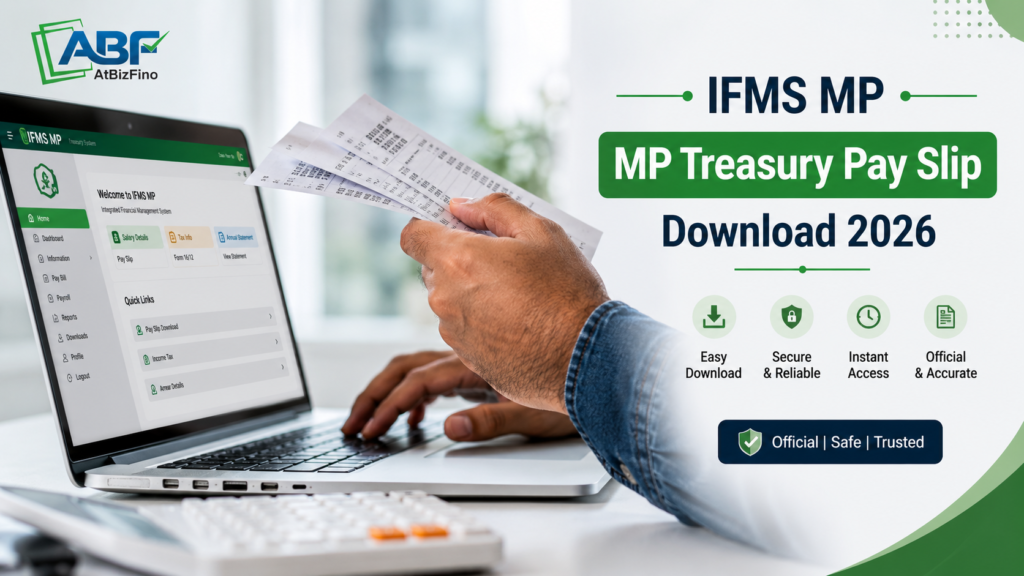
The IFMS MP Treasury Pay Slip Portal helps Madhya Pradesh Government employees access salary and treasury services online. IFMS stands for Integrated Financial Management System.
It helps users access salary and treasury services such as downloading salary slips, checking payments, viewing yearly salary details, and managing GPF accounts.
This portal is operated by the MP Treasury and Accounts Department and is used by employees, pensioners, DDOs, treasury officers, contractors, and vendors. Employees can easily download monthly salary slips in PDF format online.
| Overview of IFMS MP Treasury Portal 2026 | |
| Portal Name | IFMS MP Treasury Portal |
| Full Form | Integrated Financial Management Information System |
| Managed By | Madhya Pradesh Treasury and Accounts Department |
| Purpose | Digital management of salary, treasury, pension, and financial services |
| Official Website | MP Treasury IFMS Portal |
| Alternative Login Page | IFMS Login Page |
| Main Users | MP Government Employees, Pensioners, Treasury Officers, DDOs, Contractors & Vendors |
| Key Services | Salary Slip Download, Payment Status Check, GPF Details, Treasury Services, Annual Salary Statement |
| Salary Slip Facility | Employees can download monthly salary slips in PDF format online |
| Treasury Functions | Bill Payments, Budget Management, Challan Generation, Treasury Operations |
| Pension Services | Pension payment management and related services |
| Employee Benefits | Easy online access to salary and financial records anytime |
Who Can Use IFMS MP Treasury Pay Slip Portal?
The IFMS MP Treasury Portal mainly helps:
- Madhya Pradesh Government employees
- Department officials
- Treasury officers
- Pensioners to view pension details
- DDOs (Drawing and Disbursing Officers)
- Employees applying for salary advance loans
Only authorised employees and users can access the Mp portal using their unique login ID and password. Financial documents cannot be downloaded by unauthorised users.
Documents Required for IFMS MP Login
You may need these things to use the IFMS portal:
- Employee Code
- Mobile Number
- Department Details
- Password
- Internet Access
IFMS MP Treasury Portal Login 2026
Employees need to log in to the IFMS portal to access salary slips and treasury services. Follow these steps to log in to the IFMS portal:
- Open the official IFMS portal.
- Click on the Employee Login or IFMS Login option.
- Enter your:
- Employee Code or User ID
- Password
- CAPTCHA code
- Click on the Login button.
- Your employee dashboard will open on the screen.
IFMS MP Forgot Password Reset Process
To reset your IFMS password:
- Visit the IFMS login page.
- Click on the Forgot Password option.
- Enter your Employee ID and registered mobile number.
- Complete OTP verification.
- Set a new password.
After resetting the password, log in again with the new details.
How to Download IFMS MP Treasury Pay Slip Online 2026 ?
Downloading your pay slip from the IFMS MP portal is easy. Follow these simple steps:
Step 1: First, visit the official IFMS MP portal.
Step 2: On the homepage, now click on the Employee Corner section for employee-related services.
Step 3: Log in using your Employee Code, password, and CAPTCHA. If you are a first-time user, contact your DDO or department for login details.
Step 4: After logging in, open the Pay Slip section and choose the required month and year.
Step 5: Click on Generate or Download Pay Slip.
Your pay slip will appear on the screen. You can download or print it for future use.
Details Available in IFMS MP Treasury Pay Slip
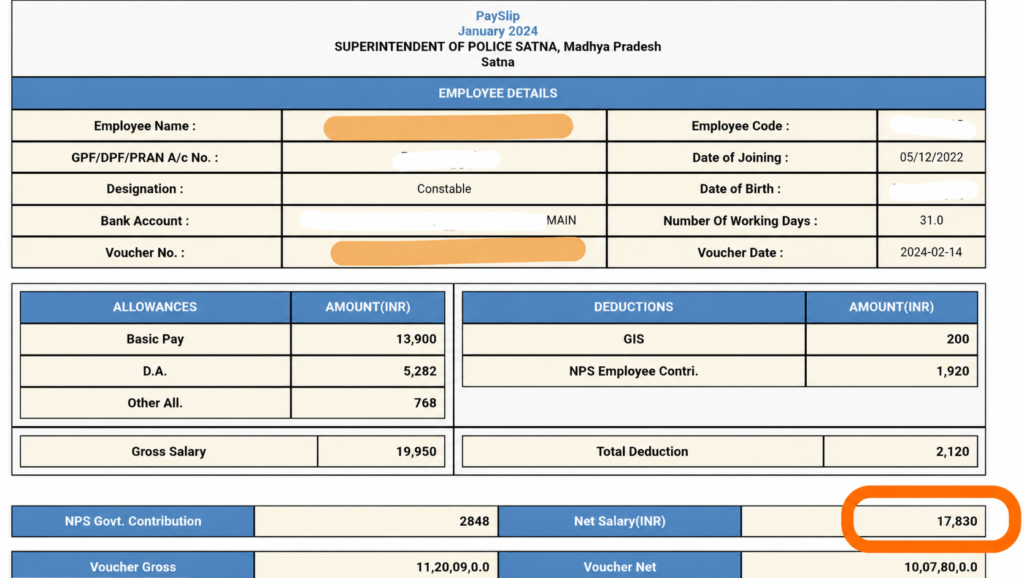
The MP Treasury Pay Slip provides detailed salary information for government employees every month. Information included in the Pay Slip:
- Employee details and department information
- Office name and salary period
- Basic salary and allowances
- DA, HRA, medical, and special allowances
- Gross salary amount
- Deductions like GPF, tax, and loans
- Final net salary received by the employee
The pay slip helps employees track salary calculations and deductions easily.
IFMS MP Treasury Registration Process
New employees must register on the IFMS MP portal before using online services.
- Visit the official IFMS MP portal.
- Click on Employee Login.
- Select New User Registration.
- Fill in your Employee Code, mobile number, and department details.
- Create your login username and password.
- Submit the form for verification.
Once verified, you can log in and use IFMS services online.
IFMS MP Annual Salary Statement Download
Employees can download their annual salary statement from the IFMS MP portal.
- Login to your IFMS account.
- Open the Reports section.
- Click on Annual Salary Statement.
- Select the financial year.
Click on Generate PDF to download the report.
| Uses of IFMS MP Annual Salary Statement | |
| Income Tax Filing | Helps employees file accurate income tax returns |
| Loan Applications | Used as proof of income while applying for loans |
| Salary Verification | Confirms yearly salary details for official use |
IFMS MP Treasury Challan Generation
The IFMS MP portal allows users to create and pay treasury challans online. The system supports tax payments, bill payments, cyber treasury services, and government fee deposits.
| Feature | Description |
| Online Challan Generation | Users can create treasury challans online |
| Digital Payment Facility | Supports secure online payments |
| Receipt Download Option | Payment receipts can be downloaded easily |
| Payment Status Tracking | Users can track challan payment status online |
IFMS MP Treasury Portal Payment Status Check
The IFMS MP portal allows employees and contractors to track payment details online. Follow These Steps:
- Visit the IFMS MP website.
- Open the Payment Status option.
- Enter your Bill Number, Treasury Code, DDO Code, and Reference Number.
- Click on Submit to view the status.
Users can see whether the payment is pending, approved, rejected, or paid.
Common Login Problems & Solutions on IFMS MP Treasury Portal
The IFMS MP portal is user-friendly, some users may face technical problems like login issues, password errors, or slow server response. Common Solutions are given below:
- Contact your DDO or treasury office for account-related help.
- Recheck your employee code, password, and other details before logging in.
- Try using the portal at another time if the server is busy.
- Clear browser cache and use an updated browser for better performance.
Users can also contact the IFMS support team for technical assistance.
| Problem | Solution |
| Wrong Password | Reset password |
| Captcha Error | Refresh captcha |
| Website Not Opening | Try Chrome browser |
| Login Failed | Check employee ID |
| PDF Not Downloading | Enable popups |
Benefits of IFMS MP Treasury Pay Slip
The IFMS MP Treasury portal helps the Madhya Pradesh Government manage salary and treasury services digitally and efficiently.
- Easy online access to financial records
- Faster and more transparent services
- Reduced chances of errors in salary processing
- Easy access for employees and departments
- Less paperwork and administrative burden
- Quick salary distribution
- Safe and secure access to salary information
- Improved record maintenance
This system also helps treasury officers and department officials handle financial work more efficiently.
IFMS MP vs Other State Salary Portals
| State | Portal | Main Features |
| Madhya Pradesh | IFMS MP Treasury Portal | Salary slips, GPF, challans, treasury services |
| Uttar Pradesh | Koshvani UP Portal | Salary slips and treasury information |
| Rajasthan | IFMS Rajasthan Portal | Employee salary and bill management |
| Bihar | e-Nidhi Bihar Portal | Salary details and pension services |
| Maharashtra | MahaKosh Portal | Treasury operations and salary services |
| Chhattisgarh | eKosh Online Portal | Employee payment and treasury services |
| Odisha | IFMS Odisha Portal | Budget, salary, and pension management |
| Karnataka | Khajane II Portal | Treasury and online salary services |
IFMS MP Treasury Pay Slip Helpline Number
Users facing login, salary slip, payment, or technical issues can contact the IFMS MP Treasury helpdesk.
Helpdesk Information:
- Toll-Free Helpline: 1800-419-8244
- Office Phone: 0755-2676021
- Email Support: dta_director@mptreasury.gov.in
Conclusion
The IFMS system has made salary work easy for MP Government employees. Employees can log in online to check salary details and download pay slips anytime.
Before IFMS, most salary-related work was handled manually, which increased paperwork and delays. Now, employees can access their salary information anytime using their phone or computer.
The portal shows important details such as salary, allowances, deductions, leave records, and other financial information clearly. Employees can also download salary slips instantly whenever needed for loans, audits, verification, or official work.
Overall, the IFMS system saves time, reduces paperwork, and improves financial management for both employees and treasury departments.
FAQs (Frequently Asked Questions)
1. What is the IFMS MP Treasury Portal and why is it used?
The IFMS MP Treasury Portal is an online portal for MP Government employees. It helps employees check salary details, download pay slips, manage GPF accounts, and use treasury services online. The system saves time and reduces paperwork.
2. Who can use the IFMS MP Treasury Portal?
The IFMS MP Treasury Portal is mainly used by Madhya Pradesh Government employees, pensioners, treasury officers, DDOs, department officials, contractors, and vendors. Only authorised users with a valid employee ID and password can log in to the portal. This helps keep salary and financial records secure and protected from unauthorized access.
3. How can employees log in to the IFMS MP Portal?
Employees can log in to the IFMS MP website using their Employee Code, password, and CAPTCHA code. After login, the dashboard opens where users can download salary slips and check payment details online.
4. What should I do if I forget my IFMS MP login password?
If you forget your password, open the Forgot Password option on the IFMS login page. Enter your Employee ID and mobile number, verify the OTP, and create a new password. After that, you can log in again.
5. How can I download my IFMS MP salary slip online?
Open the IFMS MP portal and log in to your account. Go to the Pay Slip section, choose the month and year, and click on Download Pay Slip. Your salary slip will open in PDF format, and you can save or print it.
6. What details are available in the IFMS MP Treasury Pay Slip?
The IFMS MP salary slip shows all salary details like employee name, department, basic pay, allowances, deductions, and net salary. It helps employees understand how their salary is calculated.
7. Can employees download annual salary statements from the IFMS MP portal?
Employees can download annual salary statements from the IFMS MP portal. After login, go to the Reports section, select Annual Salary Statement, choose the financial year, and download the PDF report. This document is useful for tax and loan work.
8. What services are available in the IFMS MP Treasury Portal?
The IFMS MP portal helps users access salary and treasury services online. Employees can download salary slips, check payment status, manage GPF details, pay fees, and download receipts from the portal.
9. What are the common login problems on the IFMS MP portal and their solutions?
The IFMS MP portal is easy to use, but users may occasionally face technical or login-related problems. Most issues can be resolved by correcting login details, updating the browser, clearing cache data, or enabling PDF download settings.
10. What are the main benefits of the IFMS MP Treasury system?
The IFMS MP Treasury system provides easy online access to salary and financial records. It reduces paperwork, improves transparency, minimises salary processing errors, and helps employees access information anytime from their phone or computer. The system also supports faster salary distribution, better record management, and secure access to financial documents, making treasury work easier for both employees and government departments.
Banglar Yuva Sathi Scheme 2026Lakshmir Bhandar Scheme 2026
GST Login Portal 2026