GST login makes it easy for taxpayers to use GST services online. Once you log in, you can file returns, apply for refunds, and reply to notices. You can also cancel your GST registration anytime if it is needed. Everything can be done online, so there is no need to visit CBIC offices. In this guide, we will show you how to log in GST login portal and use GST services.
What is the GST Portal?
The GST portal is a government website used all over India for GST work. You can visit it at https://www.gst.gov.in/. It helps taxpayers do important tasks like GST registration, return filing, tax payment, and refund application, before and after logging in.
How to Register for GST Login Portal?
Go to the GST portal (www.gst.gov.in) and apply for GST registration. After submitting the required details or information, you will get an acknowledgement number.
After verification by the GST officer, a GSTIN is issued, and your registration is completed. You will also receive a username and can create a password for GST login.
How to Login to GST Portal as First-Time Users?
If you are a new user, follow these steps to create your GST login:
Step 1: Go to the GST homepage and click on the “Login” option at the top right.
Step 2: Go down and at the bottom of the page, find the “First time login” message and click on the “here” link.
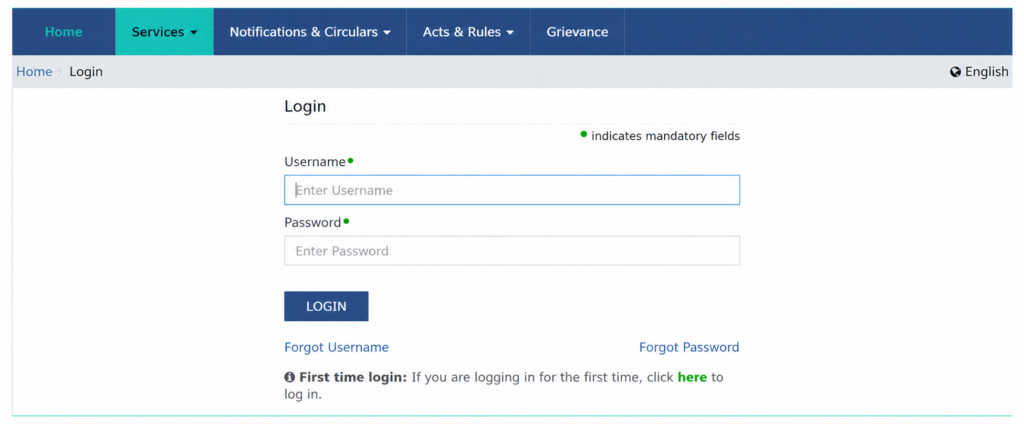
Step 3: Enter your Provisional ID, GSTIN, or UIN along with the password sent to your email. Then enter the captcha code and click on “Login”.
Step 4: Enter your new username and password. Confirm the password and click “Submit”.
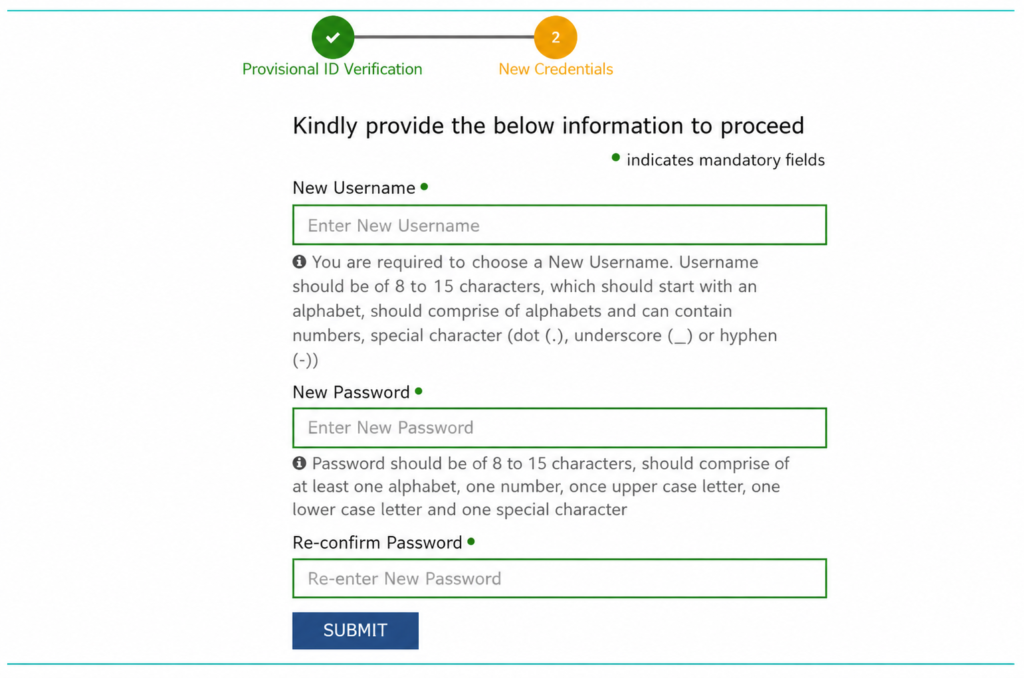
Step 5: Once your username and password are created, you will see a success message. Now you can log in to the GST portal.
Step 6: After your first login, you will be asked to add your bank details. Click on the “FILE AMENDMENT” button.
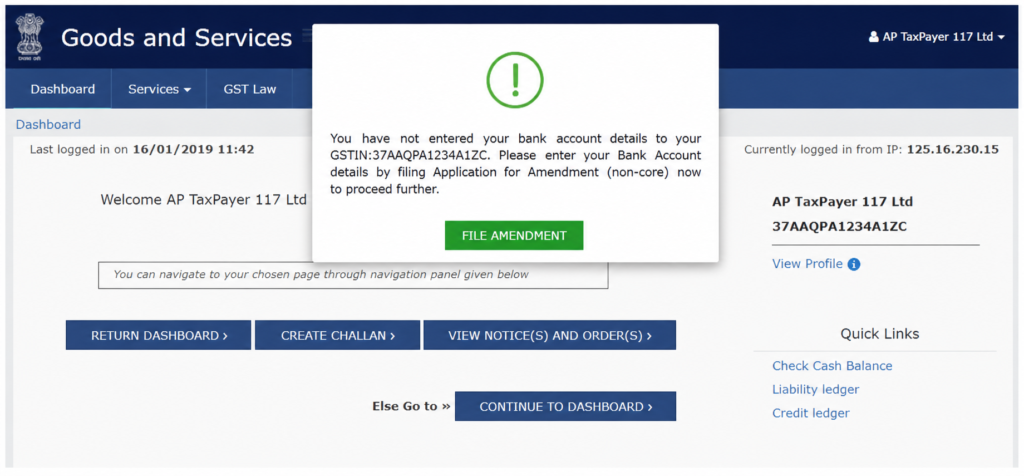
Step 7: The form will appear. Click on the bank account tab, select “ADD NEW”, fill in your details, and submit.
How to Login to the GST Portal?
Follow the steps below for GST login existing users:
Step 1: Go to the GST website and select “Login” from the top right corner.
Step 2: Type your username and password, fill the captcha, and click “Login”.
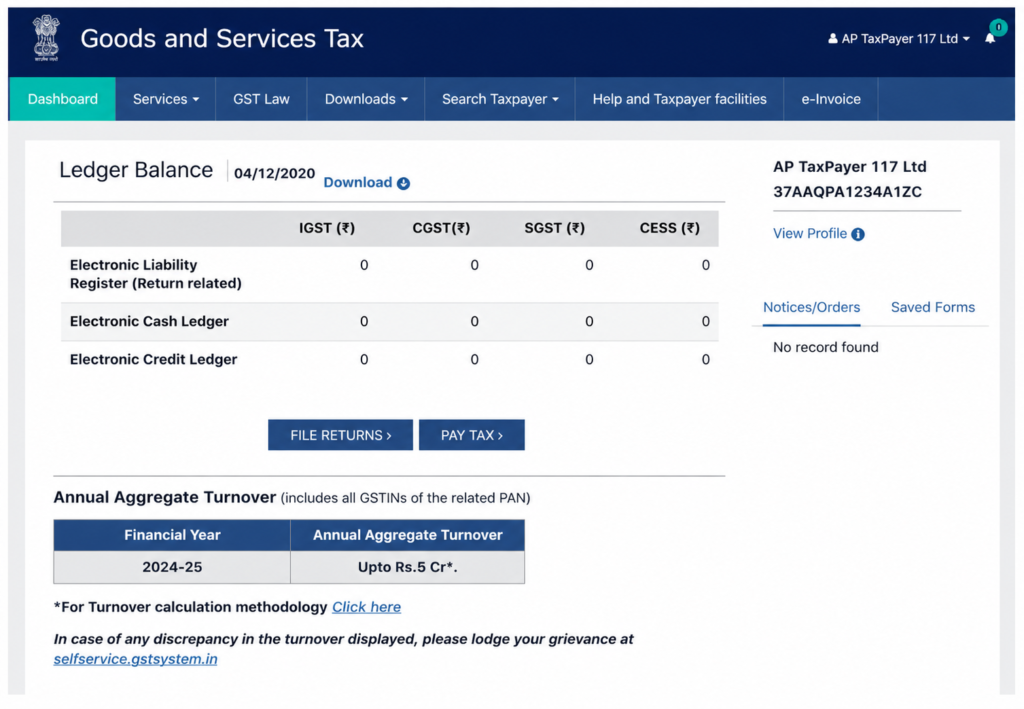
Step 3: Once you log in, your dashboard will appear. Here you can check your GST details, file returns, pay tax, and see notices.
How to Check your Status on the GST Login Portal?
You can check your GST registration status both before and after login. The application is usually processed within 15 days. You can track your gst application status online through the GST portal.
| Feature | Details |
| GST Status Check | You can check GST registration status both before and after login |
| Processing Time | Application is usually processed within 15 days |
| Tracking Method | Track your GST application status online through the GST portal |
| Accessibility | Available anytime via the official GST portal |
Steps to Download GST Certificate Without Login
If you have GST registration, you can download your GST certificate from the portal. It is available in Form GST REG-06. No hard copy will be given.
Below are the step-by-step instructions to download the GST Registration Certificate Form GST REG-06:
Step 1: Open the GST website and log in using your details.
Step 2: Click on “Services”, then “User Services”, and select “View/Download Certificate”.
Step 3: Select the “Download” icon to download the certificate.
Step 4: Open the file which you downloaded and print your certificate.
Step 5: Put the printed certificate at your shop or office where it is clearly visible.
Key Services After Login in GST Portal
Once you log in, you will see these options on the GST homepage:
Registration Section: Under the “Services” section, you can apply for a new GST registration. Businesses must register if their turnover over the limit—₹40 lakh for goods, ₹20 lakh for services, and ₹10 lakh for special category states.
Payments: In the “Payments” section, you can make GST payments and generate challans. You can also check payment status and raise a complaint if needed.
User Services: This section provides options to search HSN codes, view holidays and cause lists, find GST Practitioners, generate user IDs, search BoE, and access advance rulings.
Refunds: Here you can check the status of your GST refund.
e-Way Bill System: Clicking this tab opens the e-way bill portal. You can also check FAQs and the user guide there.
Track Application Status: This tab in the “Services” section allows users to track the status of their GST registration and refund applications.
How to Check GST Status?
- Open the GST website and log in to your account using your details.
- After logging in, you will see your dashboard on the home screen.
- From the dashboard, you can easily see if your returns for the last five periods are filed or not.
- You can easily check your profile, notices, and orders from the dashboard.
- You can file returns and make tax payments directly from the dashboard.
How to Create Temporary User IDs for Unregistered Users in GST Login Portal?
Unregistered users can generate a temporary user ID to access limited GST portal services such as tracking application status, viewing ledgers, and creating challans. The process is as follows:
- Go to the official GST website.
- Click on “Services” and then select “User Services”.
- From the options, select “Generate User ID for Unregistered Applicant”.
- Read the terms and conditions and click on “Yes” to accept them.
- Complete the registration form and select “Proceed”.
- Enter the OTP received in your email on the “Verify OTP” page and proceed.
- You will see a confirmation message once your temporary user ID is created. and the login details will be sent to your registered email.
- Login to the GST portal with your temporary user ID and password.
What is the GST e-Way Bill System?
The e-Way Bill system is used by GST-registered businesses and transporters to create a digital waybill for moving goods. It is needed when the goods value is above ₹50,000. It applies to all types of movement, including purchases from unregistered persons.
| Topic | Details |
| What is e-Way Bill System | A digital system used to generate a waybill for movement of goods |
| Who Uses It | GST-registered businesses and transporters |
| Value Limit | Required when goods value exceeds ₹50,000 |
| Purpose | To track and validate movement of goods under GST |
| Applicability | Applies to all types of movement, including purchases from unregistered persons |
Conclusion
GST login makes tax work simple and online. You can do everything on the GST portal like registration, filing returns, paying tax, and checking refunds. You do not need to visit any office.
Both new and existing users can use the portal easily with their login details. The dashboard shows all your GST work in one place. You can download certificates, check status, and create e-way bills easily.
Overall, the GST portal is easy to use and helps businesses manage their taxes without any trouble.
FAQs (Frequently Asked Questions)
1. What is GST login and why is it important?
GST login allows taxpayers to access the GST portal and manage their tax activities online. It is important because it helps in filing returns, paying taxes, checking notices, and applying for refunds without visiting any office.
2. How can I log in to the GST portal?
You can log in by visiting the GST website, clicking on the login button, and entering your username, password, and captcha code. After login, your dashboard will be displayed.
3. What should I do if I forget my GST login password?
If you forget your password, click on the “Forgot Password” option on the login page. Enter your GSTIN or username, verify using OTP, and create a new password.
4. How long does GST registration take?
GST registration is usually mainly within 15 days after submitting the application and documents. You can track the status online via the GST portal.
5. Can I check GST status without login?
Yes, you can check your GST registration status without logging in by using the GST portal’s tracking option and entering your ARN (Application Reference Number).
6. Is it possible to download a GST certificate without login?
No, you need to log in to the GST login portal to download your GST certificate (Form GST REG-06). The certificate is available only in digital format.
7. What services are available after GST login?
After login, you can file returns, pay taxes, track refunds, update registration details, generate challans, check notices, and access many other GST services.
8. What is a temporary user ID in GST?
A temporary user ID is for unregistered users. It allows limited access to GST services like tracking application status, viewing ledgers, and creating challans.
9. What is an e-Way Bill and when is it required?
An e-Way Bill is a digital document required for transporting goods. It is mandatory when the value of goods exceeds ₹50,000.
10. What can I see on the GST dashboard after login?
The GST dashboard displays return status, ledger balances, notices, and orders. You can also file returns and pay taxes directly.
Lakshmir Bhandar Scheme 2026Banglar Yuva Sathi Scheme 2026